
Hey Readers. How's all the work going. Doing Well ? With a happy and proud face I would want to tell you that our blog has reached a total of 30000 clicks in just 9 months of blogging. Not a very good stat but we would like to satisfied with what we have.
Today I am back with another interesting post on Google Chromecast. What is that?? Want to know? Read On....


Today I am back with another interesting post on Google Chromecast. What is that?? Want to know? Read On....
What is Google Chromecast??
Google last week launched a $35 HDMI dongle, called Chromecast, that's designed to rival Apple's AirPlay and devices like Apple TV and Roku. It released with support for Netflix and YouTube, as well as compatibility with Macs, PCs, iOS and Android.
The ability to hit a Cast button to send video or entire Chrome tabs to a TV made everyone immediately excited, and there was such a huge interest that Google had to call off a three-month Netflix promotion just one day after unveiling Chromecast because of overwhelming demand.
Looks And Hardware Specifications
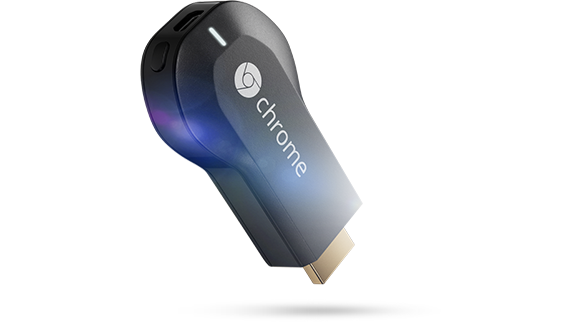
- It's a small plastic dongle which is lightweight and pocket size Just being 3 inches long, Chromecast measures 2.5 inches when protruding from an HDMI port.
- It has an LED indicator on the rear, alongside a button and Micro USB port. The USB port supplies Chromecast with power through an external powder adapter for the wall. The adapter enables Chromecast to stay powered on when the TV is off, thus enabling you to switch on the TV and change inputs via HDMI control.
- You will also get an HDMI extension cable in the box for those who cannot plug Chromecast in the rear of their TV or need something extra for their set-up.
- Chromecast uses an Azure Wave AW-NH387 802.11 b/g/n WLAN and Bluetooth, as well as an FM combo module IC chip and Marvell DE3005-A1 system-on-a-chip and has 4GB of flash memory and 512MB of RAM.
Performance on Netflix And Youtube
- After plugging in Chromecast, you must download the set-up app for Mac, PC or Android. This will get it online with a Wi-Fi network. The set-up app asks you to pick a network, but it's important to note that Chromecast only supports 2.4GHz networks. You then have to name your Chromecast, install the Google Cast Chrome extension on your device - and that's it.
- Chromecast itself actually connects to the Web and streams video files. To start streaming, just select the dedicated Cast button in the YouTube or Netflix apps - these are the only apps with support, aside from Google's Play media apps.
- Once you select the Cast button in either app, Chromecast will play the video files while your device becomes the remote control. Since Chromecast is doing all the work, you can play with your device while watching TV. This means you can open and close apps and switch between tabs without disrupting your video.
- This also means you can switch platforms. For instance, when casting Netflix on Android, you could switch to iOS and continue managing your Netflix without a hiccup. To manage the currently streaming video, such as hitting rewind or pause, you have to use the original app (ie, Netflix, YouTube, etc) from which you "casted" the video. Google could easily circumvent this hassle by implementing playback buttons to Chromecast set-up app.
Extra features
- Beyond Netflix and YouTube, the big feature with Chromecast is the ability to send Chrome tabs to the TV.
- People could just connect their laptops to TVs for web browsing on a television monitor, but then there's always the annoyance of cords, delayed performance and more issues. Chromecast addresses all of these problems, and it does it well.
- Chromecast sends what's open in a Chrome tab from your device to the TV, and this is otherwise called tab casting. The mouse cursor doesn't appear on the TV, and there's some lag.
- Flash video - such as Vimeo and Hulu - in the web browser goes full-screen without any complications, while music services like Pandora play well too. An "Audio Mode" will even adjust bandwidth usage and frame rates when listening to music - that's handy.
Conclusion
Thus Chromecast is a very handy dongle for screening and viewing videos at high speeds. Being a cheap priced one it has a bright future and hope it does wonders in the market.
If you are interested in buying this product : Click Here
Source: Pocket-lint
Hope you liked my post. Hope to be back soon.
0 comments:
Post a Comment
Your comments are always appreciated.
Note:
1. Please do not include links in comments or it will be removed later.
2. Please do not spam because they will be deleted immediately upon our notice.
Regards,
The Sneeze